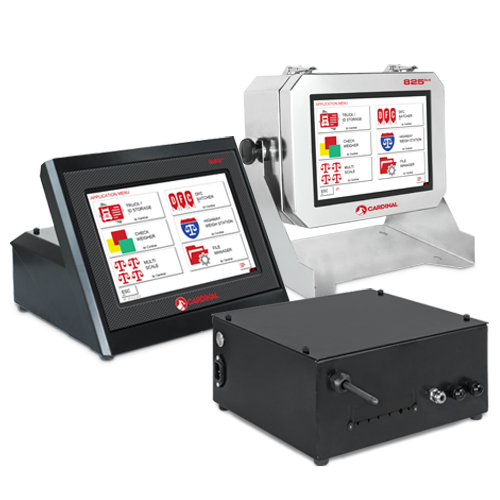
This firmware file is the operating software for the 195 Vision and 225 Navigator Gen2 Weight Indicators. It includes the latest updates that improve setup, performance, and overall operation of the weight indicators.
To download the file: Click on the link above.
Updating the 195 Vision and 225 Navigator Gen2 Indicator Firmware Instructions
(Requires FAT32 formatted USB Flash Drive)
For instructions on how to update the 195 Vision and 225 Navigator Gen2 indicator firmware, navigate to the 195 Vision Resource Type > Manuals or 225 Navigator Gen2 Resource Type > Manuals, and download the corresponding PDF:
195 and 225 Gen2 Indicator Firmware Update Instructions
Version History
3.9.11 | Date: 04/10/2026
- Fixed an ID Storage printout issue to force prints to use currently selected units on printout.
3.9.10 | Date: 04/03/2026
- Updated the DLC SmartCAN Errors and Strings.
3.9.9 | Date: 03/10/2026
- Fixed a Check Weigher light bar issue causing the lights to not display properly.
- Fixed a Pieces and Count double print issue.
- Added support for the EtherCAT card.
3.9.8 | Date: 03/05/2026
- Updated the default NControl slot settings.
- Fixed the problem causing Pass 2 to not recall the tare in NControl tickets.
- Replaced the three hardcoded PROMPT labels for NControl tickets with values that are input and saved in settings.
- Fixed Print tab PCS weight not printing on a ticket.
- Added consecutive number printing for Normal Mode of Operation.
- Setup key now displays after Push Button Tare when counting.
3.8.4 | Date: 01/29/2026
- DIO outputs now disable upon exiting Diagnostics.
- Improved DLC diagnostics loading, min/max menu, load cell assignment missing right-arrow, and Error counts when exiting diagnostics.
- Fixed password so only Menu 1 items are locked.
- Resolved issue that could prevent the USB to not create a file folder.
- Fixed a bug that could cause Legacy nControl to fail on ticket downloads.
- Corrected screen refresh issue that caused PackWeigher to not display.
- Increased the allowable number of characters for print tab start-of-line and end-of-line fields to 100.
- Corrected issues causing IOR/IOW commands to not work with single scale card and the DIO card installed.
3.7.6 | Date: 12/31/2025
- Corrected issue that could cause a Local indicator to lock up if in the Load Cell Assignment menu and the Remote was connected.
- Disabled all outputs when leaving the Diagnostics menu for Digital outputs.
3.7.5 | Date: 12/18/2025
- Corrected issue with Local/Remote not displaying weight correctly on Legacy 225 indicator.
- Corrected issue that was causing kg to show zero on converted/li>
3.7.4 | Date: 12/18/2025
- Mode of Operation: Livestock Weigher – Changed Total Print to be like that on the Legacy 2/li>
3.7.3 | Date: 12/09/2025
- Added Custom weight units as a secondary option.
- Corrected mismatched SWT, SCT, ZCT values.
- Corrected issue causing the capacity to change if the scale was zeroed with a negative weight.
- Corrected lock up issue upon entering menus including that of the Keypad Test.
- Corrected issue on OIML and LFT causing Z Track not to be set properly.
- Updated IOW, IOR write and read serial commands for the 2XX-DIO option card.
3.7.2 | Date: 12/05/2025
- Added Mode of Operation: Livestock Weigher with Inclinometer.
3.6.10 | Date: 11/18/2025
- Corrected an issue causing the indicator to lockup on startup.
3.6.9 | Date: 11/11/2025
- Corrected an issue in Truck/ID Storage causing a zero Tare weight vehicle to not store weights.
- nControl Operation functions inline with the legacy indicators operation.
- Updated the DLC Diagnostics menus for Millivolts readings clearing the error counts.
- Corrected DLC Auto Zero error causing Scale 2 to Auto Zero if motion was detected on Scale 3.
3.6.8 | Date: 11/04/2025
3.6.7 | Date: 11/03/2025
- Added Ethernet Local/Remote feature.
3.6.6 | Date: 10/28/2025
- Corrected Wi-Fi setup menu to correctly update new SSID.
3.6.5 | Date: 10/20/2025
- Corrected issue with EIP Card commands causing the keyboard and pushbutton tare and scale selection not to function.
3.6.4 | Date: 10/17/2025
- Corrected an issue with the Dynamic IP address so that it updates correctly in the Wi-Fi menu.
3.6.3 | Date: 10/16/2025
- Added Wi-Fi Local/Remote feature.
3.6.1 | Date: 10/01/2025
- Correct an issue causing the SB600 format not to show Net/Gross properly.
- Updated default Gross Only setting to be false.
3.5.2 | Date: 09/24/2025
- Corrected an issue causing the Badge Reader to not function.
- Corrected the issue causing a error in the idle Message Slot Operation.
- Corrected the non printing issue with Normal Mode of Operation.
3.5.1 | Date: 09/18/2025
- Updated the default value of the site ID to “No” for defaults or new devices.
- Corrected an issue where indicators would randomly beep when the “Badge Reader Type” was set to any option other than “None,” even if no serial devices were connected.
3.4.17 | Date: 09/16/2025
- Configure the Badge Reader with all badge types.
3.4.16 | Date: 09/15/2025
- Added Badge Reader for Axle Weigher Operation, ID Storage Operation, and Package Weigher Operation.
3.4.15 | Date: 09/11/2025
- Updated the DLC Diagnostics Menu.
- Improved the Load Cell Assignment Menu.
- Improved the DLC Disconnection Messages.
- Corrected the “SAMPLES=” error in the Normal Mode of Operation when the prompt was left empty.
- Added the About Menu DLC Card version information.
<
tion.